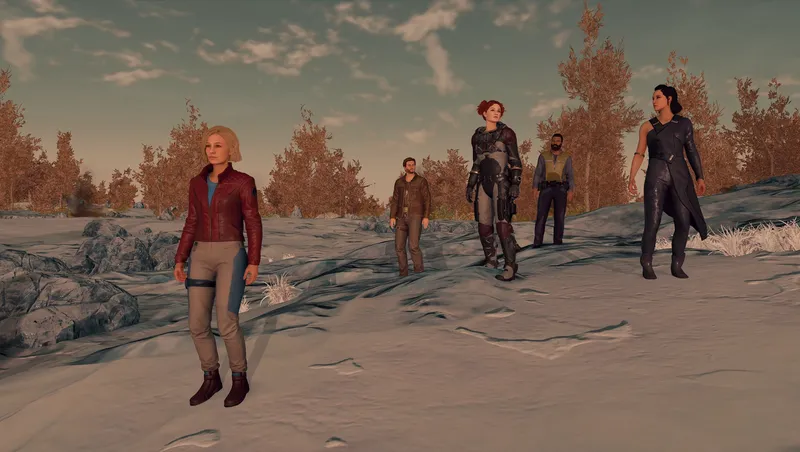
The Gang's All Here - Achievement Friendly
By Aurelianis
Community Rating
BEFORE INSTALLING/UPDATING - Dismiss all crew/companions that are actively following you (assigned to ship/outpost is fine), save, exit, then install. When UPDATING, delete the mod entirely from the Creations menu, then download it again to ensure all files are updated.
If the Crew list isn't correct in the terminal - The crew list is populated when a save is loaded and when a new crew member is recruited. If the list is not populated after updating, just save and load to get it to populate.
For more detailed info and articles, visit The Gang's All Here on Nexus (https://www.nexusmods.com/starfield/mods/7469)
Command Followers Easily - Using a terminal that can be accessed by using a favorite, you can teleport, dismiss, tell them to wait, access inventory, etc. See the pics attached to see all options available.
Chat Options - Select which companion will speak during different scenarios. Who can speak for you during quests, who will speak during quest scenes, who will comment on looting and who comments on locations and events like using Starborn Powers. Have the same companion for all, or a different companion for each. You can also turn off loot and location comments (they are turned off by default). NOTE: Most of the options are only for Constellation Companions, but you can choose to have an Elite Crew member comment during location changes and events.
Teleport and Hire Companions - All with the click of a button.
Gain Affinity Quickly - All companions that are currently following you will gain affinity, so you can get in their good graces all at the same time if you like.
Relationship Control - You can change the amount of affinity and/or the amount of time needed to reach the next Story Gate for the companions. You can also force the next story gate.
See Companion Relationship Info - The Constellation Companions sub menu also includes the current companion affinity, relationship status and anger level.
Command Crew Individually - The terminal has the option to view all available Elite Crew so you can individually tell them to wait, follow, dismiss, teleport and open their inventory.
Release notes
Xbox
-
4.1-When selecting a different commenter for loot/trigger/quest comments, the terminal will now update with the newly selected commenter without the need to exit the terminal.
-
4.0-Repacked BA2 as strings were not working.
-
4.0a-Fixed an issue that could cause some crew to not be able to be dismissed in certain scenarios. Since this bug is gone, the panic button has been removed.
-If another mod modified Flirt Cooldown and/or Wants to Talk Cooldown values the setting could not be modified in the TGAH terminal. Fixed this so it will show [Non-TGAH Value] next to the setting. Clicking on the setting will set it to the default and allow you to change it from there.
-Various spelling/grammar fixes.
-"Follower Control" has been renamed to "The Gang's All Here Control" to make it less generic.
-Important notifications will now show up as a Tutorial Message.
-You will no longer be able to randomize the Main Companion if you have no companions or only one companion following you.
-Added failsafe so you can't inadvertently dismiss a locked in companion.
-Added failsafe so you can't inadvertently tell a companion to wait when they shouldn't be allowed to wait (Commitment quests).
-When allowing multiple followers when a companion is locked in, you can now use the vanilla dialogue to pickup/dismiss other companions/crew.
-Lots of text changes in the terminal to (hopefully) make things easier to understand.
-Under Chat Options, the current commenter will now be displayed next to the button that allows you to change them so you can see who the current commenter is without going down another level.
-View Crew is now called Crew Members and has been moved from Command All Followers to the main terminal menu beneath Constellation Companions.
-Inventory Management was moved from the main terminal menu to the Command All Followers menu to keep the number of options on the main menu to 4 to keep from scrolling.
-Scripts have been mostly rewritten to account for all the changes that have been made since v3.4.
-Localized plugin for easier translations. -
3.8-Added Open Crew Assignment to the Command Followers menu.
-Added current assignments to View Crew menu.
-Added Fix Follower Stopped Following function to the View Crew menu (I modified Constellation Companions and View Crew to use the same submenu and just used conditioning to filter what should be shown).
-When allowing multiple companions when another is locked in, the locked in companion will be set to the Main Companion and changing the MC will not be allowed until there is no longer a locked in companion.
-Improved terminal responsiveness by using timers to call functions for certain terminal entries to keep the terminal from locking up, i.e. when telling a follower to wait or opening a follower's inventory.
-Added a panic button for those with stalkers. I have not had any issues dismissing followers but it seems others have had this happen so I created a terminal entry to dismiss every follower and reset all Actor Values that go along with that. This is different from Dismiss All and should only be used if Dismiss All does not work. You will need to force exit the terminal and a confirmation message will appear. -
3.7.1- Fixed an issued that could cause some recruited crew from showing up in the terminal.
- Fixed issue when selecting a crew member under View Elite Crew where the terminal page wouldn't show their name and instead would just have [..]
- More responsive terminal: Instead of having the aliases that create the terminal menus fill every time you select a terminal entry to view crew members, the aliases will now be filled when you load a save game and when a new crew member is recruited.
- View Elite Crew will now show the crew members in alphabetical order instead of in the order of recruitment. Any DLC and/or mod added crew will show up at the end of the list in order of recruitment.
- Inventory Management will now show the 4 Constellation companions as the first 4 items with crew members in alphabetical order instead of in the order of recruitment.
- Added an option under Settings > Misc Settings that allows Generic Crew to be managed. You must completely exit the terminal and relaunch to see the changes.
- Added an option under Settings > Misc Settings that allows multiple followers on quests that normally only allow one follower, i.e. The Empty Nest and Companion Quests.
- Tweaked some of the help text in the terminal menus. -
3.7- Fixed an issued that could cause some recruited crew from showing up in the terminal.
-
3.5-Adds support for Shattered Space crew members as well as any other mod added crew as long as they use the vanilla follower system. Menus are dynamically created using quests and aliases. There is support for up to 45 companions/crew. If you need more than that, sorry, I can't help you.
-Terminal should be much more responsive.
-Better compatibility. I've removed LOTS of vanilla overrides and found other ways to keep comments from overlapping.
-Added an option under Chat Settings to allow companions to talk to each other when they are following you. Be warned, if you turn this on they will never shut up.
-Fixed some bugs.
PC
-
4.1-When selecting a different commenter for loot/trigger/quest comments, the terminal will now update with the newly selected commenter without the need to exit the terminal.
-
4.0-Repacked BA2 as strings were not working.
-
4.0a-Fixed an issue that could cause some crew to not be able to be dismissed in certain scenarios. Since this bug is gone, the panic button has been removed.
-If another mod modified Flirt Cooldown and/or Wants to Talk Cooldown values the setting could not be modified in the TGAH terminal. Fixed this so it will show [Non-TGAH Value] next to the setting. Clicking on the setting will set it to the default and allow you to change it from there.
-Various spelling/grammar fixes.
-"Follower Control" has been renamed to "The Gang's All Here Control" to make it less generic.
-Important notifications will now show up as a Tutorial Message.
-You will no longer be able to randomize the Main Companion if you have no companions or only one companion following you.
-Added failsafe so you can't inadvertently dismiss a locked in companion.
-Added failsafe so you can't inadvertently tell a companion to wait when they shouldn't be allowed to wait (Commitment quests).
-When allowing multiple followers when a companion is locked in, you can now use the vanilla dialogue to pickup/dismiss other companions/crew.
-Lots of text changes in the terminal to (hopefully) make things easier to understand.
-Under Chat Options, the current commenter will now be displayed next to the button that allows you to change them so you can see who the current commenter is without going down another level.
-View Crew is now called Crew Members and has been moved from Command All Followers to the main terminal menu beneath Constellation Companions.
-Inventory Management was moved from the main terminal menu to the Command All Followers menu to keep the number of options on the main menu to 4 to keep from scrolling.
-Scripts have been mostly rewritten to account for all the changes that have been made since v3.4.
-Localized plugin for easier translations. -
3.8-Added Open Crew Assignment to the Command Followers menu.
-Added current assignments to View Crew menu.
-Added Fix Follower Stopped Following function to the View Crew menu (I modified Constellation Companions and View Crew to use the same submenu and just used conditioning to filter what should be shown).
-When allowing multiple companions when another is locked in, the locked in companion will be set to the Main Companion and changing the MC will not be allowed until there is no longer a locked in companion.
-Improved terminal responsiveness by using timers to call functions for certain terminal entries to keep the terminal from locking up, i.e. when telling a follower to wait or opening a follower's inventory.
-Added a panic button for those with stalkers. I have not had any issues dismissing followers but it seems others have had this happen so I created a terminal entry to dismiss every follower and reset all Actor Values that go along with that. This is different from Dismiss All and should only be used if Dismiss All does not work. You will need to force exit the terminal and a confirmation message will appear. -
3.7.1- Fixed an issued that could cause some recruited crew from showing up in the terminal.
- Fixed issue when selecting a crew member under View Elite Crew where the terminal page wouldn't show their name and instead would just have [..]
- More responsive terminal: Instead of having the aliases that create the terminal menus fill every time you select a terminal entry to view crew members, the aliases will now be filled when you load a save game and when a new crew member is recruited.
- View Elite Crew will now show the crew members in alphabetical order instead of in the order of recruitment. Any DLC and/or mod added crew will show up at the end of the list in order of recruitment.
- Inventory Management will now show the 4 Constellation companions as the first 4 items with crew members in alphabetical order instead of in the order of recruitment.
- Added an option under Settings > Misc Settings that allows Generic Crew to be managed. You must completely exit the terminal and relaunch to see the changes.
- Added an option under Settings > Misc Settings that allows multiple followers on quests that normally only allow one follower, i.e. The Empty Nest and Companion Quests.
- Tweaked some of the help text in the terminal menus. -
3.7- Fixed an issued that could cause some recruited crew from showing up in the terminal.
-
3.5-Adds support for Shattered Space crew members as well as any other mod added crew as long as they use the vanilla follower system. Menus are dynamically created using quests and aliases. There is support for up to 45 companions/crew. If you need more than that, sorry, I can't help you.
-Terminal should be much more responsive.
-Better compatibility. I've removed LOTS of vanilla overrides and found other ways to keep comments from overlapping.
-Added an option under Chat Settings to allow companions to talk to each other when they are following you. Be warned, if you turn this on they will never shut up.
-Fixed some bugs.
Additional Screenshots Available
This mod has 12 additional screenshots available on the official Bethesda.net page.
View All Screenshots on Bethesda.netMod Feedback Thread
r/starfieldmodfeedbackThis is a dedicated feedback thread where users can provide direct feedback on this mod.
YouTube Videos
Community Rating & Feedback
No reviews with comments yet.
Be the first to leave a review!
Related Starfield Mods

By sp0ckrates • 2 years ago
MAKES CREW AND COMPANIONS AMAZING!
By Deebz • 2 years ago
Various improvements to how followers behave while following you around.
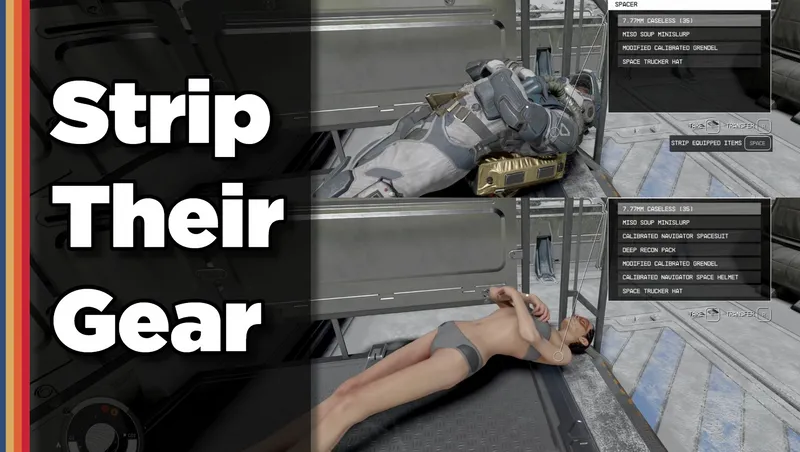
By shadedness • 2 years ago
Strip any equipped armor or clothes from your fallen foes! Or simply loot-all with 1 button. Steal items from knocked-out targets instead of pick-pocketing and waking them up!
Quick Actions
Your Rating
Sign in to rate and review this mod—your vote helps the community.
Community Rating
Mod Information
- Published
- Jul 01, 2025
- Last Updated
- Jul 29, 2025
- Platforms
- PC, Xbox
Search Mods
More by Aurelianis








Related Starfield Mods